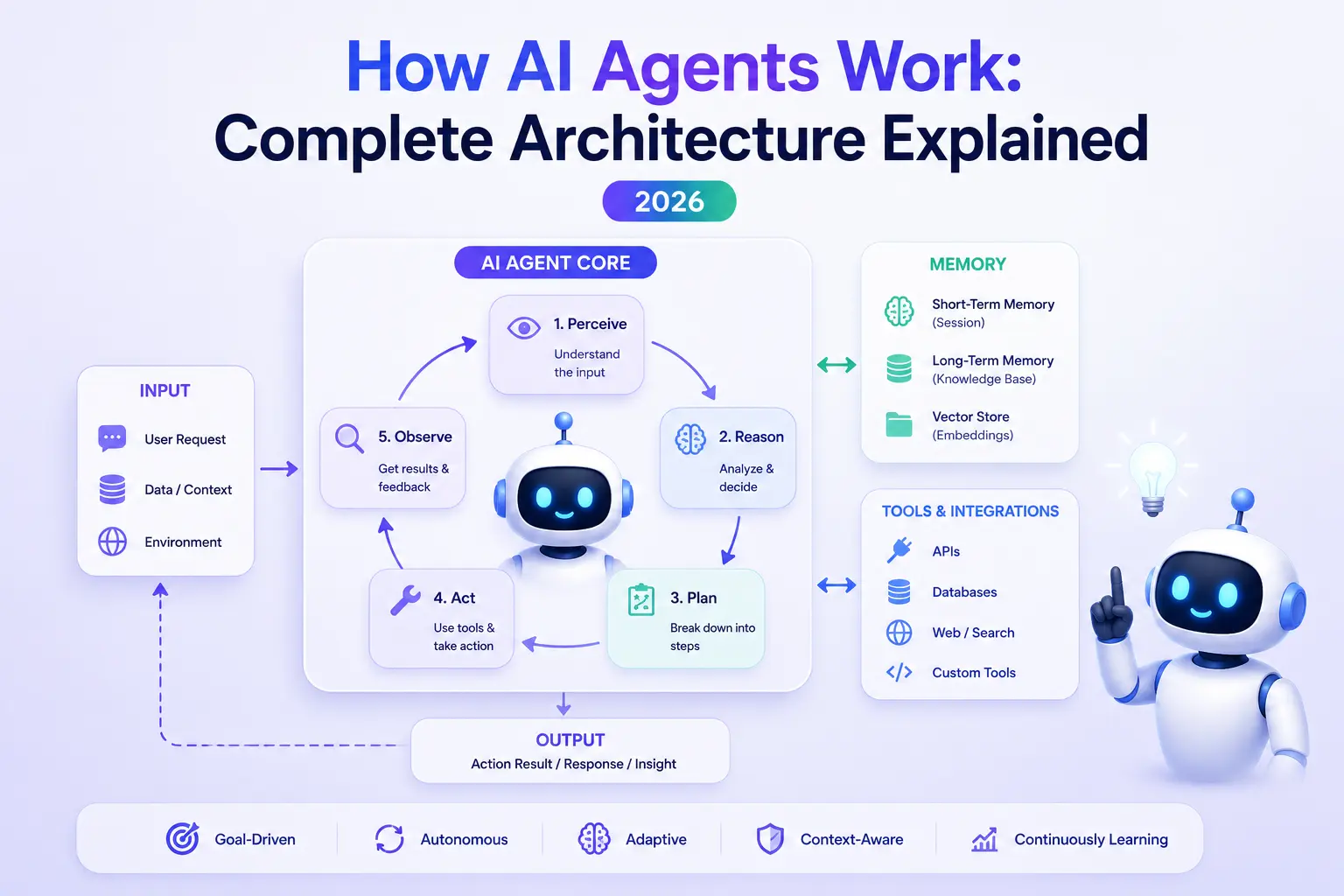
How AI Agents Work: Complete Architecture Explained (2026)
Ask an AI agent to "find the three best-rated project management tools under $10/month and email me a comparison," and something remarkable happens. It searches the web, opens pricing pages, takes notes, discards options that don't fit, builds a comparison, drafts an email, and sends it — checking its own work along the way.
No single AI model does all of that. What you're watching is an architecture: a handful of components wired around a large language model that turn "text in, text out" into "goal in, finished work out."
In our beginner's guide, What Is an AI Agent?, we introduced agents at a high level. This guide goes one layer deeper. By the end, you'll understand every component in a modern agent, how they connect, and why agents fail when one of them is missing.
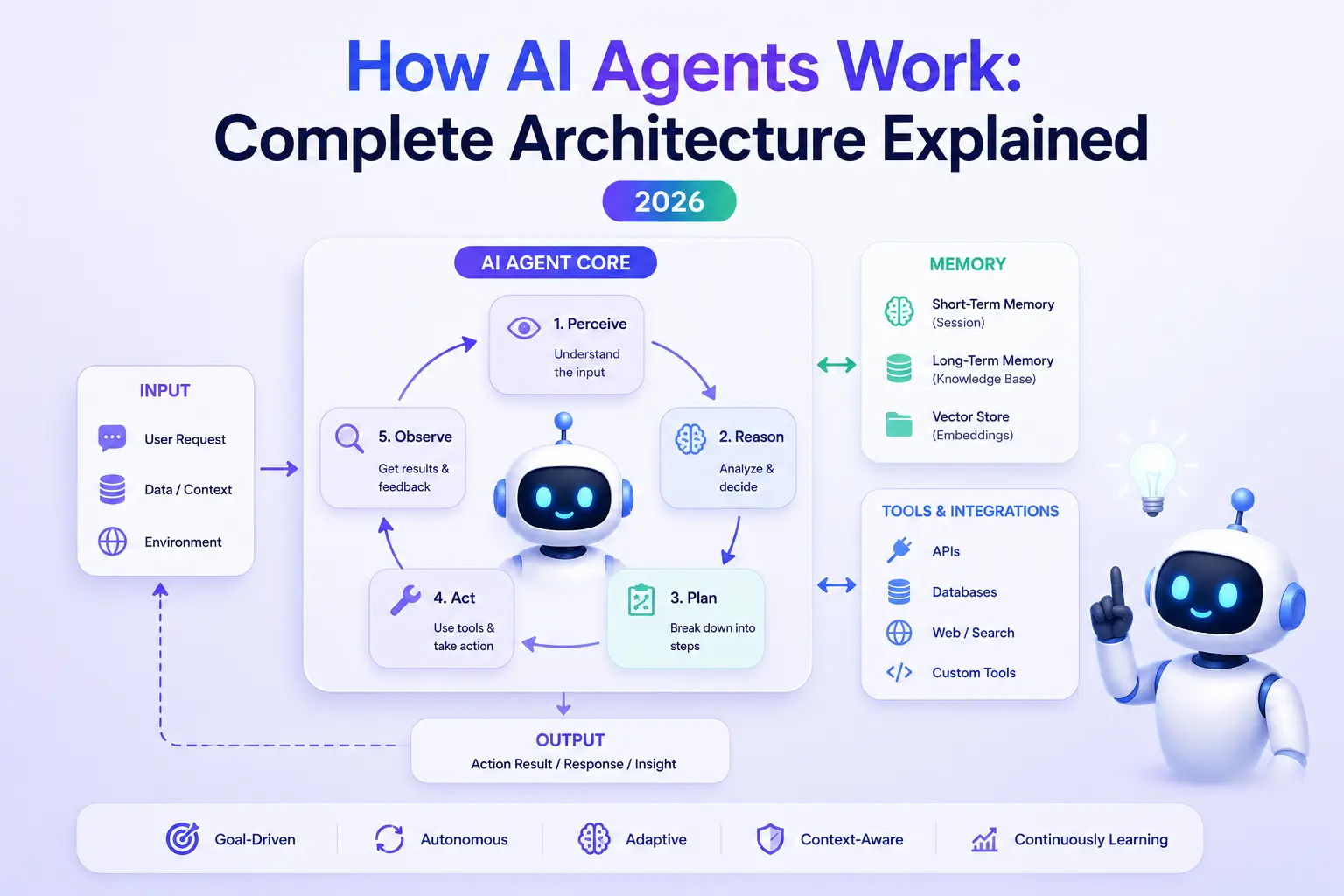
The Agent Loop: The Heartbeat of Every Agent#
Strip away every framework and vendor name, and every AI agent runs the same cycle, thousands of times a day:
- Perceive — take in the goal, the environment, and any new information.
- Plan — decide what to do next to move toward the goal.
- Act — execute that step, usually by calling a tool.
- Observe — read the result of the action.
- Reflect — check progress: done, on track, or off course?
Then the loop repeats — with one crucial difference from a normal program: the LLM decides what happens next at every iteration. There's no fixed script. If step 3 returns an error, the agent doesn't crash; it reads the error in step 4 and picks a different approach in the next cycle.
This loop is why agents feel qualitatively different from chatbots. A chatbot runs the loop exactly once: you speak, it responds, done. An agent keeps looping — trying, observing, correcting — until the goal is met or it decides it can't be.
Everything else in this article is a component that makes one part of that loop work well.
Component 1: Perception — What the Agent Can See#
An agent can only act on what enters its context. Perception is everything that feeds information into the loop:
- The user's goal — the instruction that starts everything.
- Environment state — files in a repo, rows in a database, the HTML of a page.
- Tool results — search results, API responses, terminal output.
- Feedback — error messages, test failures, user corrections.
All of this lands in one place: the model's context window, the working space an LLM can "see" at once. Modern models handle hundreds of thousands of tokens, but context is still finite — and that constraint shapes the entire architecture. An agent reading a 400-page PDF can't hold all of it in view, so it needs strategies: summarize sections, store passages in memory, retrieve only what's relevant right now.
A useful mental model: the context window is the agent's desk. Perception decides what gets placed on the desk. Memory (coming below) is the filing cabinet next to it. Great agents are ruthless about keeping the desk clean.
If you want a refresher on how LLMs process context in the first place, our guide on how large language models work covers it step by step.
Component 2: Planning — Breaking Goals Into Steps#
Give an LLM a big fuzzy goal ("launch a newsletter") and ask it to act immediately, and it flails. Planning is the component that turns fuzzy goals into an ordered sequence of concrete, achievable steps.
Modern agents plan in three ways, often combined:
Decompose first. Before acting, the agent writes out a plan: 1) research platforms, 2) compare pricing, 3) draft the first issue, 4) set up the signup page. This becomes a checklist it works through and updates as reality intervenes.
Plan one step at a time. Instead of a full upfront plan, the agent asks "given everything I know now, what's the single best next action?" — replanning implicitly on every loop iteration. This handles surprises well but can lose the big picture.
Reflect. After acting, strong agents critique themselves: "Did that actually work? Is this approach still the right one?" Reflection is what stops an agent from confidently marching down a dead end for fifty steps.
The trade-off between upfront planning ("plan-and-execute") and step-by-step reactivity is one of the most important design decisions in agent architecture — we'll come back to it in the patterns section below, and our dedicated guide AI Agent Planning Explained covers decomposition, decision making and reflection in full depth.
Component 3: Reasoning — Thinking Before Acting#
Planning decides what to do; reasoning is the quality of thought applied to each decision. Two techniques transformed agent reasoning:
Chain-of-thought. Instead of jumping to an answer, the model writes out intermediate reasoning: "The user wants tools under $10/month. Tool A is $8 — qualifies. Tool B is $12 — excluded unless there's an annual discount... let me check." Writing the steps out measurably reduces errors, and modern "reasoning models" now do this internally, at length, before responding.
ReAct (Reason + Act). The pattern that started the modern agent era. The model alternates between a Thought (reasoning about what's needed), an Action (a tool call), and an Observation (the tool's result):
Thought: I need current pricing for Notion. My training data may be stale.
Action: web_search("Notion pricing 2026")
Observation: Notion Plus is $10/user/month billed annually...
Thought: That's exactly at the budget limit. I should check Trello next.
That interleaving — think, act, observe, think again — is the agent loop made explicit in text. Nearly every framework you'll meet implements some refinement of it.
Component 4: Memory — What the Agent Remembers#
Here's the uncomfortable truth at the center of agent design: LLMs remember nothing between calls. Every invocation starts blank. Whatever "memory" an agent has is engineered around the model, not inside it.
Agent memory splits into two layers:
Short-term memory is the running record of the current task: the conversation so far, recent tool results, the current plan. It lives directly in the context window. It's fast and perfectly accurate — and it evaporates when the task ends or the context fills up. When the desk overflows, agents compress: summarizing older steps ("steps 1–14: researched 6 tools, shortlisted 3") to make room while keeping the essence.
Long-term memory survives across sessions. It's how an agent remembers you — your preferences, past decisions, project conventions — and what it learned last week. Since it can't live in the model, it lives in external storage, most commonly a vector database: texts are converted into embeddings (lists of numbers capturing meaning), and when the agent needs to recall something, it embeds its question and retrieves the stored entries whose meaning sits closest. Meaning-based search, not keyword search — a query about "how the user likes reports formatted" finds the note that says "prefers bullet-point summaries, hates tables," even though they share no words.
| Short-term memory | Long-term memory | |
|---|---|---|
| Lives in | Context window | External store (vector DB, files, database) |
| Survives | Current task only | Across sessions, indefinitely |
| Speed | Instant — already in view | Requires a retrieval step |
| Capacity | Limited by context size | Effectively unlimited |
| Failure mode | Overflow — old info pushed out | Retrieval misses — relevant memory not found |
The retrieval mechanics here are the same ones behind RAG — if you want the full picture of embeddings, chunking and retrieval quality, read our guide on what RAG is and how it works.
Memory is deep enough that it deserves its own article — read AI Agent Memory Explained for memory architectures, what to store versus discard, and how production agents avoid "remembering" wrong things.
Component 5: Tool Calling — The Agent's Hands#
Everything so far happens inside the model's head. Tool calling is where the agent touches the world — and it's the single clearest line between a chatbot and an agent.
The mechanics are simple and worth demystifying. The agent's builder gives the model a list of available tools, each with a name, a description, and typed parameters:
{
  "name": "search_flights",
  "description": "Search available flights between two cities on a date",
  "parameters": {
    "from": "string — departure city code",
    "to": "string — arrival city code",
    "date": "string — YYYY-MM-DD"
  }
}
When the model decides a tool is needed, it doesn't run anything itself — it outputs a structured request: search_flights(from="COK", to="NRT", date="2026-08-14"). The surrounding program executes the real API call, and feeds the result back into the context as an observation. The model then continues reasoning with fresh, real-world data.
That's the whole trick. The LLM never gains magical abilities; it becomes a decision-maker that knows when to reach for which tool, and the scaffolding does the reaching.
Tools come in a few flavors:
- Information tools — web search, database queries, file reading. Low risk.
- Action tools — sending email, writing files, executing code, making purchases. Higher risk, because mistakes have consequences.
- Other AI tools — an agent can call another model, or another agent, as a tool.
For years, every tool needed custom integration code per app. The Model Context Protocol (MCP) changed that by standardizing how AI applications connect to tools and data sources — build a tool server once, and any MCP-compatible agent can use it. We've covered it in depth in our Model Context Protocol guide.
Component 6: Execution and Feedback — Closing the Loop#
The least glamorous component is the one production teams spend the most time on: the runtime that surrounds the model and actually runs the loop. It's responsible for:
- Executing tool calls safely — with timeouts, retries, and rate limits.
- Validation — checking the model's tool arguments before running them (did it pass a real city code, or hallucinate one?).
- Permissions — deciding which actions run automatically and which need human approval. Reading a file? Fine. Sending money? A human clicks yes first.
- Stopping conditions — ending the loop when the goal is met, when a step budget is exhausted, or when the agent is clearly stuck.
- Feedback routing — making sure errors and results land back in the context so the next iteration can respond to them.
This is where "human-in-the-loop" lives, and it's why serious agent deployments feel more like infrastructure engineering than prompt engineering. The model provides judgment; the runtime provides guardrails.
Putting It All Together: One Real Trace#
Here's the full architecture running a real task — "Find the three best-rated PM tools under $10/month and email me a comparison":
- Perceive: Goal enters the context. Long-term memory retrieval adds a stored fact: user prefers bullet-point summaries.
- Plan: Decompose — search tools → verify pricing → shortlist by rating → write comparison → send email.
- Act:
web_search("best project management tools 2026")→ Observe: ten candidates. - Act:
web_search("Trello pricing"), then Asana, then ClickUp... → Observe: two candidates exceed budget. Reflect: Plan update — replace them with next-best options. - Act:
read_page(g2.com/...)for ratings → Observe: ratings collected. Older search results get summarized to keep the context lean. - Reflect: Three tools confirmed under $10 with strong ratings. Comparison drafted — as bullet points, because memory said so.
- Act:
send_email(...)— the runtime pauses for human approval, then sends. Loop ends: goal met, in 14 iterations.
Every component appeared: perception fed the desk, planning ordered the work, reasoning filtered candidates, memory personalized the output, tools touched the world, and the runtime kept it safe. Remove any one of them and the task fails in a predictable way.
Architecture Patterns You'll Meet in the Wild#
Real systems combine the components in a few recurring shapes:
Single ReAct loop. One model, one loop, a toolbox. Simple, transparent, and the right default for most tasks. Its weakness: very long tasks drift as the context fills.
Plan-and-execute. A planning step produces an explicit task list; execution works through it, replanning when steps fail. More token-efficient on long tasks, and easier for humans to audit — you can read the plan before anything runs.
Reflection layers. A second pass (or second model) critiques outputs before they ship — "grade this answer; revise if below standard." Cheap insurance for quality-sensitive work.
Multi-agent systems. Several agents with different roles — researcher, writer, reviewer — coordinated by an orchestrator. Powerful for genuinely parallel work, but coordination adds cost and new failure modes. Don't reach for this until a single agent demonstrably can't cope; the full trade-offs are in Single-Agent vs Multi-Agent Systems.
Where Agent Architectures Fail#
Understanding the components means you can predict the failures:
- Context overflow (perception/memory): the desk fills, early instructions fall off, and the agent forgets what it was doing. Fix: aggressive summarization and retrieval instead of accumulation.
- Infinite loops (planning/reflection): the agent retries the same failing action forever. Fix: step budgets, and reflection that recognizes "this approach isn't working."
- Hallucinated tool arguments (tool calling): the model invents a plausible-looking parameter — a fake city code, a wrong file path. Fix: strict validation before execution.
- Compounding errors (reasoning): a small early mistake — one wrong price — silently corrupts every downstream step. Fix: verification steps that re-check critical facts against sources.
- Over-permissioned actions (execution): an agent with production-database write access needs exactly one bad day. Fix: least-privilege tools and human approval on irreversible actions.
None of these are exotic — every production agent team meets all five. The architecture above exists precisely to contain them.
FAQ#
Do all AI agents use this architecture? The vocabulary varies by framework, but yes — perception, planning, memory, tools, and a runtime loop appear in every serious agent system, from coding agents to customer-support agents.
Is an agent just an LLM with tools? Tools are necessary but not sufficient. Without planning and reflection you get a chatbot that can call APIs — it acts, but it doesn't pursue a goal. The loop is what makes it an agent.
How many iterations does a typical task take? Anywhere from 3–5 for simple lookups to hundreds for complex coding tasks. Cost scales with iterations, which is why planning quality and context hygiene matter commercially, not just technically.
Keep Learning#
This article is part of our AI Agent series, built around the pillar guide:
- Start here: What Is an AI Agent? Complete Beginner Guide
- How Large Language Models Work — the brain inside the loop
- What is RAG? Explained Simply — the retrieval machinery behind agent memory
- Model Context Protocol (MCP) Guide — the standard powering modern tool calling
- What is AI Engineering & How to Start — the career path that builds these systems
Go deeper on individual components: AI Agent Memory Explained and AI Agent Planning Explained are live now. Coming next in this series: What is Tool Calling in AI Agents? — taking the last core component to full depth.