AI Agent Memory Explained: How Agents Remember (2026)
Tell your AI assistant on Monday that your company's reports must always be in bullet points, never tables. On Wednesday, ask it for a report — and get a beautiful, useless table.
Everyone who works with AI has felt this. And it points at the strangest fact about large language models: they remember nothing. Every single call to an LLM starts from a completely blank slate. The model that wrote you a brilliant analysis ten seconds ago has, by its next invocation, no idea you exist.
So how do modern AI agents remember your preferences for months, recall a decision from a project three weeks back, and get better at working with you over time?
The answer is that memory is not a feature of the model — it's a system engineered around the model. This guide explains that system: the layers, the storage, the retrieval, and the architectures that production agents use. It's part of our AI Agent series built around What Is an AI Agent?, and goes deep on one component from our architecture guide.
Why Memory Is the Difference Between a Tool and a Colleague#
A stateless AI is permanently a stranger. It can be brilliant, but every session starts with you re-explaining context — your stack, your style, your constraints. The cost isn't just annoyance; it caps how valuable the AI can ever become, because value compounds through accumulated context.
Memory changes the curve. An agent that remembers:
- Personalizes — bullet points, not tables. Formal tone for clients, casual for the team.
- Maintains continuity — "continue the migration we started Tuesday" just works.
- Learns from outcomes — the approach that failed last time isn't proposed again.
- Gets cheaper to use — less re-explaining means shorter prompts and fewer corrections.
In our AI Agent vs Chatbot comparison we called this "goldfish vs colleague." Memory is the entire mechanism behind that difference.
The Two-Layer Model: Desk and Filing Cabinet#
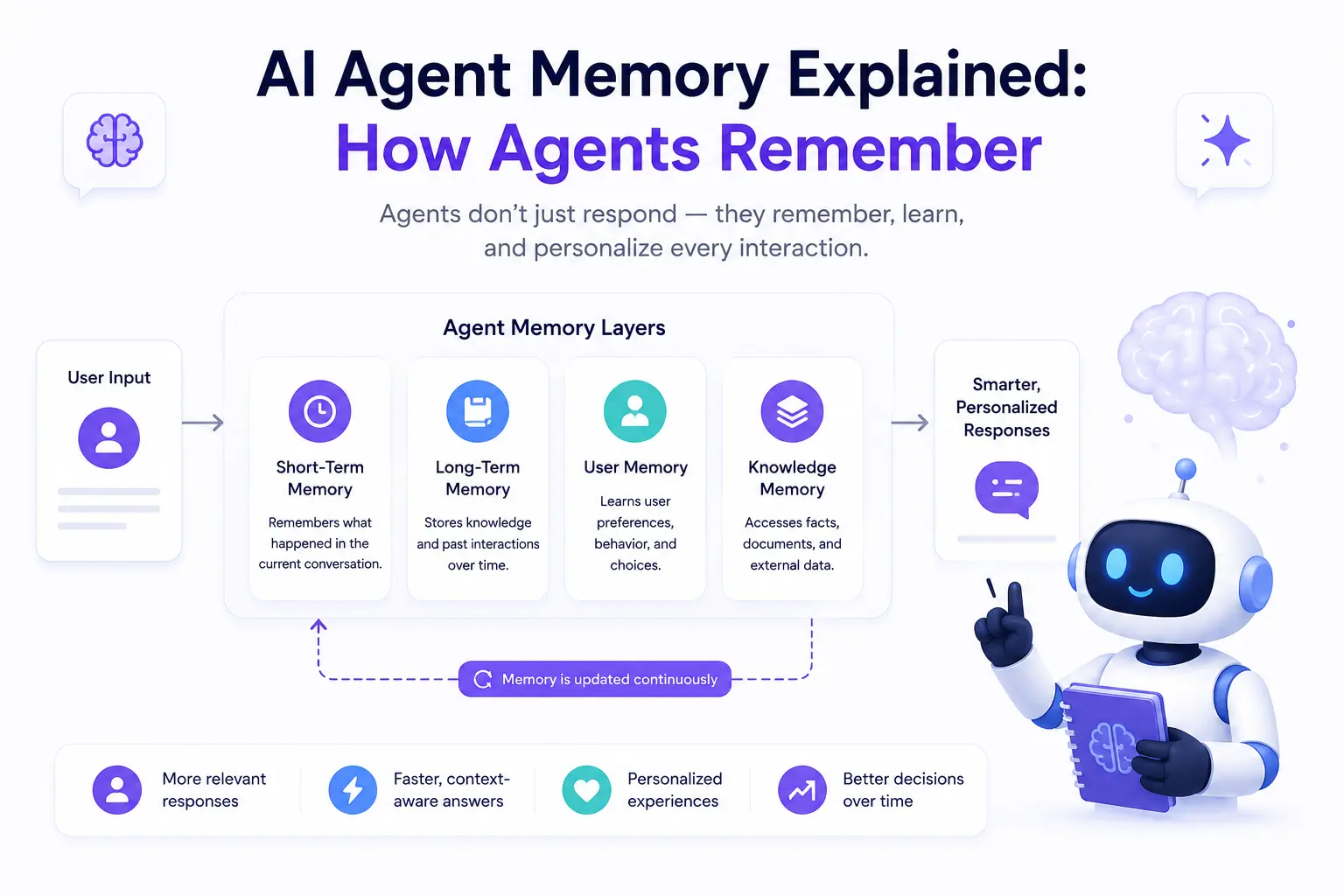
Every agent memory system, however fancy, is built from two layers:
Short-term (working) memory is what the agent holds right now: the conversation so far, the current plan, recent tool results. It lives in the model's context window — the finite space of text the LLM can see in one call. Think of it as a desk: everything on it is instantly visible, but the desk has edges.
Long-term memory is everything that must survive beyond the current task: preferences, facts, past episodes, learned procedures. Since the model can't retain anything, this layer lives in external storage — files, databases, and most famously vector databases — and gets loaded back onto the desk only when relevant. That's the filing cabinet.
| Short-term memory | Long-term memory | |
|---|---|---|
| Lives in | The context window | External storage (vector DB, files, SQL) |
| Survives | The current task/session | Indefinitely, across sessions |
| Capacity | Fixed by the model's context size | Effectively unlimited |
| Access speed | Instant — already visible | Requires a retrieval step |
| Typical contents | Conversation, plan, recent tool output | Preferences, facts, past episodes, skills |
| Failure mode | Overflow — early content pushed out | Retrieval miss — the right memory isn't found |
The craft of memory engineering is deciding what moves between the desk and the cabinet, and when.
Short-Term Memory: Managing a Desk That's Always Too Small#
Context windows are huge in 2026 — hundreds of thousands of tokens — and still, agents overflow them constantly. A single debugging session can burn through logs, file contents and tool output faster than you'd think. When the desk fills, models don't fail loudly; they quietly lose track of early instructions, which is far worse.
Production agents manage working memory with a few standard moves:
Summarization (compression). Replace fifty old messages with a paragraph: "Steps 1–14: researched six tools, eliminated three for price, shortlisted Trello, Asana, ClickUp." The details are gone; the decisions survive.
Sliding windows. Keep the most recent N turns verbatim, compress or drop everything older. Simple and effective for conversation-heavy agents.
Scratchpads. A dedicated section of context the agent itself maintains — current goal, key facts, to-do list — that gets carried forward intact while chatter is trimmed. This is why good agents "re-anchor" on their plan instead of drifting.
Selective loading. Don't read the whole 400-page PDF into context; extract the sections the current step actually needs.
A takeaway that surprises beginners: more context is not automatically better. Irrelevant text on the desk actively degrades reasoning — models get distracted by it. Clean desks outperform full ones.
Long-Term Memory: The Three Things Worth Remembering#
Borrowing from cognitive science, agent memories fall into three types — and good systems treat them differently:
Episodic memory — what happened. Records of past events: "On July 3rd, we migrated the auth service; the JWT refresh bug took two days." Useful for continuity ("continue where we left off") and for learning from outcomes.
Semantic memory — what's true. Facts and preferences, independent of when they were learned: "User's stack is Next.js + MongoDB. Reports in bullet points. Deploys on Vercel." This is the layer that makes personalization work.
Procedural memory — how to do things. Learned methods and conventions: "To release: run tests → bump version → tag → deploy staging → smoke test → promote." In practice this is often stored as instructions or skill files the agent loads when the situation matches — the same idea behind a project's CLAUDE.md or agent instruction files.
Vector Databases: How Memories Are Stored#
You could store memories as plain text files and search them by keyword — and for small systems, honestly, that works. But keyword search breaks down fast: a memory saying "prefers concise bullet summaries" will never match the query "how does the user like reports formatted?" — zero words overlap.
Enter embeddings. An embedding model converts any text into a vector — a long list of numbers (often 768–3,072 of them) that captures the text's meaning. Texts with similar meaning land near each other in this number-space, even when they share no words. "Bullet summaries" and "report formatting preferences" end up neighbors.
A vector database stores millions of these embeddings and answers one question extremely fast: "here's a new vector — find the stored ones closest to it." That's semantic search: search by meaning, not by matching words.
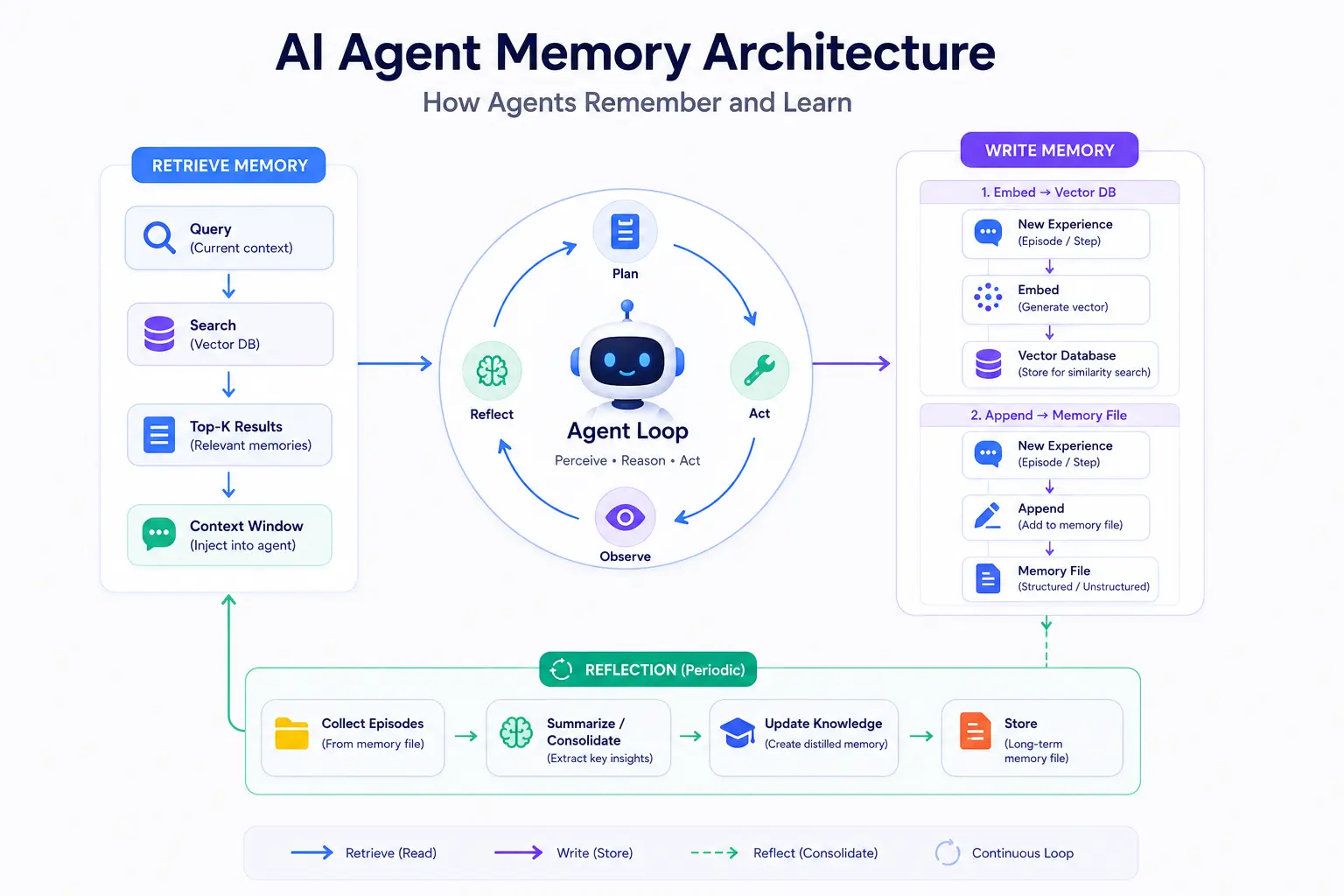
The write path of agent memory looks like this:
- Something worth remembering happens ("user said: always bullet points").
- The text is embedded into a vector.
- Vector + original text + metadata (timestamp, source, type) are stored.
Popular choices in 2026 range from dedicated vector databases (Pinecone, Weaviate, Qdrant, Chroma, Milvus) to vector support bolted onto databases you already run (pgvector for Postgres, MongoDB Atlas Vector Search — convenient if your stack is already there). For most agent projects, the honest advice is: start with whatever is already in your stack; switch to a dedicated store when scale demands it.
Retrieval: How Agents Actually Recall#
Storage is the easy half. The hard half is retrieval — getting the right memory onto the desk at the right moment. The flow:
- The agent forms a query from its current need: "user's report formatting preferences."
- The query is embedded into a vector.
- The vector database returns the top-K nearest memories.
- Those memories are inserted into the context window.
- The model reasons with them as if it "remembered."
If this sounds exactly like RAG (Retrieval-Augmented Generation) — it is. Agent memory retrieval and RAG share the same machinery; the difference is what's in the store (your documents vs. the agent's accumulated experience). Our RAG guide covers the retrieval mechanics — chunking, similarity, and quality tuning — in full depth, and the upcoming AI Agent vs RAG article in this series maps exactly where the two overlap and where they don't.
Production retrieval usually goes beyond pure similarity:
- Hybrid search — combine semantic similarity with keyword matching, because IDs, names and error codes need exact matches.
- Recency and importance weighting — a preference stated yesterday should outrank a contradicting one from January; a memory marked "critical" outranks trivia.
- Reranking — retrieve 20 candidates cheaply, then use a smarter model to pick the best 3 before they enter precious context space.
Memory Architectures: Putting It Together#
How do real systems wire these pieces? Four patterns cover most of what you'll meet:
1. Context stuffing (no real memory). Reload the full conversation history every call, until it doesn't fit. Fine for short-lived chatbots; collapses for agents. This is the baseline everything else improves on.
2. Retrieval-augmented memory. The workhorse pattern: store everything notable in a vector database, retrieve top-K relevant memories into context each turn. Scales well; quality depends almost entirely on retrieval tuning.
3. Hierarchical summarization. Keep recent turns verbatim, a summary of the session above that, and a summary-of-summaries for long-term. Older = more compressed. Great for very long-running tasks; the risk is losing a detail that later turns out to matter.
4. Memory files + reflection. The agent maintains explicit, human-readable memory documents — a profile of the user, project notes, learned procedures — and periodically reflects: reviews recent episodes and decides what to write down, update, or delete. Slower and costlier per update, but the memories are auditable — you can open the file and see exactly what the agent believes. Many modern coding agents (including the CLAUDE.md convention) work this way.
Real systems mix these: a scratchpad for working memory, memory files for stable facts, a vector store for the long tail of episodes.
What to Remember, What to Forget#
Beginners assume the goal is remembering everything. Production teams learn fast that forgetting is a feature:
- Stale memories mislead. "User is on Node 18" was true in March and is wrong today. Memories need timestamps, and retrieval should prefer fresh over stale — or better, the reflection step should update the fact instead of accumulating contradictions.
- Noise drowns signal. Storing every message means retrieval must fish relevant needles from an ocean of "ok thanks." Store decisions, preferences, outcomes — not chatter.
- Wrong memories compound. If the agent misremembers a preference, every future task inherits the error. This is why auditable memory (files you can read and correct) is so valuable in practice.
- Privacy is a memory problem. Long-term stores accumulate sensitive data — names, keys accidentally pasted, health details. Production memory needs deletion paths, retention rules, and honest answers to "what exactly has this agent stored about me?"
A good mental rule: remember like a great executive assistant — decisions, preferences, commitments, lessons — not like a court stenographer.
A Memory Trace: Watch It Work#
"Draft our Q3 report" — Wednesday, new session.
- Retrieve (semantic): query "report preferences" → "bullet points, never tables" (stored Monday), "Q-reports go to Sarah for review."
- Retrieve (episodic): query "Q2 report" → "Q2 draft was too long; user cut it to 2 pages."
- Working memory: the agent's scratchpad now holds: goal, three retrieved memories, plan.
- Act: drafts a 2-page, bullet-pointed report, addressed for Sarah's review.
- Reflect & write: after the user approves with "perfect," the agent stores an episodic memory — "Q3 report accepted first pass; 2-page bullet format confirmed" — reinforcing the preference.
Monday's throwaway comment shaped Wednesday's output. That's the entire promise of agent memory, working.
FAQ#
Doesn't a bigger context window solve memory? No — it enlarges the desk, not the filing cabinet. Context still resets between sessions, still costs money per token, and models still reason worse when buried in irrelevant text. Even million-token contexts need retrieval and summarization.
Is agent memory the same as RAG? Same machinery, different content. RAG retrieves from your documents; memory retrieves from the agent's accumulated experience. Most serious agents run both, often in the same vector database. (Full comparison coming in AI Agent vs RAG.)
Do I need a vector database for my first agent? Usually not. A memory file the agent reads and updates gets you shockingly far, and it's debuggable. Add vector retrieval when memories outgrow what fits in context.
Can the model itself be fine-tuned to "remember"? Fine-tuning bakes in knowledge, but it's slow, expensive, and can't be edited or deleted per-user. Runtime memory systems remain the practical answer for personalization.
Keep Learning#
Part of the FindUrAI AI Agent series:
- The pillar: What Is an AI Agent? Complete Beginner Guide
- How AI Agents Work: Complete Architecture Explained — where memory fits among the other components
- AI Agent vs Chatbot — why memory is half the difference
- What is RAG? Explained Simply — the retrieval machinery in full depth
- How Large Language Models Work — why models are stateless in the first place
Also in this series: AI Agent Planning Explained — how the plans stored in working memory get made. Coming next: What is Tool Calling in AI Agents? and AI Agent vs RAG — each will link from here when it goes live.