What Is an AI Agent? Complete Beginner Guide (2026)
What if ChatGPT could not only answer your question about flights to Tokyo — but actually search prices, compare airlines, book the ticket, and add it to your calendar, all without you guiding every step?
That's the difference between a chatbot and an AI Agent, and it's why agents have become the biggest trend in AI Engineering. Companies everywhere are moving from "AI that talks" to "AI that does."
If you're a developer, student, or just curious, this guide will teach you what an AI Agent actually is, how it works under the hood, and what you'd need to learn to build one — with zero prior AI knowledge assumed.
Before Understanding AI Agents, Let's Understand AI#
Four terms come up constantly. Let's define each in one breath.
Artificial Intelligence (AI) is software that performs tasks that normally need human intelligence — understanding language, recognizing images, making decisions. Your email spam filter is AI. So is ChatGPT.
Machine Learning (ML) is the main way we build AI today. Instead of writing rules by hand ("if the email says FREE MONEY, mark as spam"), we show the computer thousands of examples and let it figure out the patterns itself.
Deep Learning is machine learning using neural networks — layered structures loosely inspired by the brain. Stacking many layers lets computers learn very complex patterns, like what a cat looks like or how sentences flow.
A Large Language Model (LLM) is a deep learning model trained on enormous amounts of text. It learned one deceptively simple skill: predicting the next word. Do that well enough, at a large enough scale, and you get systems like Claude, GPT, and Gemini that can write, summarize, reason, and code. When people say "AI" in 2026, they usually mean an LLM.
Here's the key limitation, though: an LLM by itself can only produce text. It can tell you how to book a flight. It cannot book one. That gap is exactly what AI Agents fill.
What Is an AI Agent?#
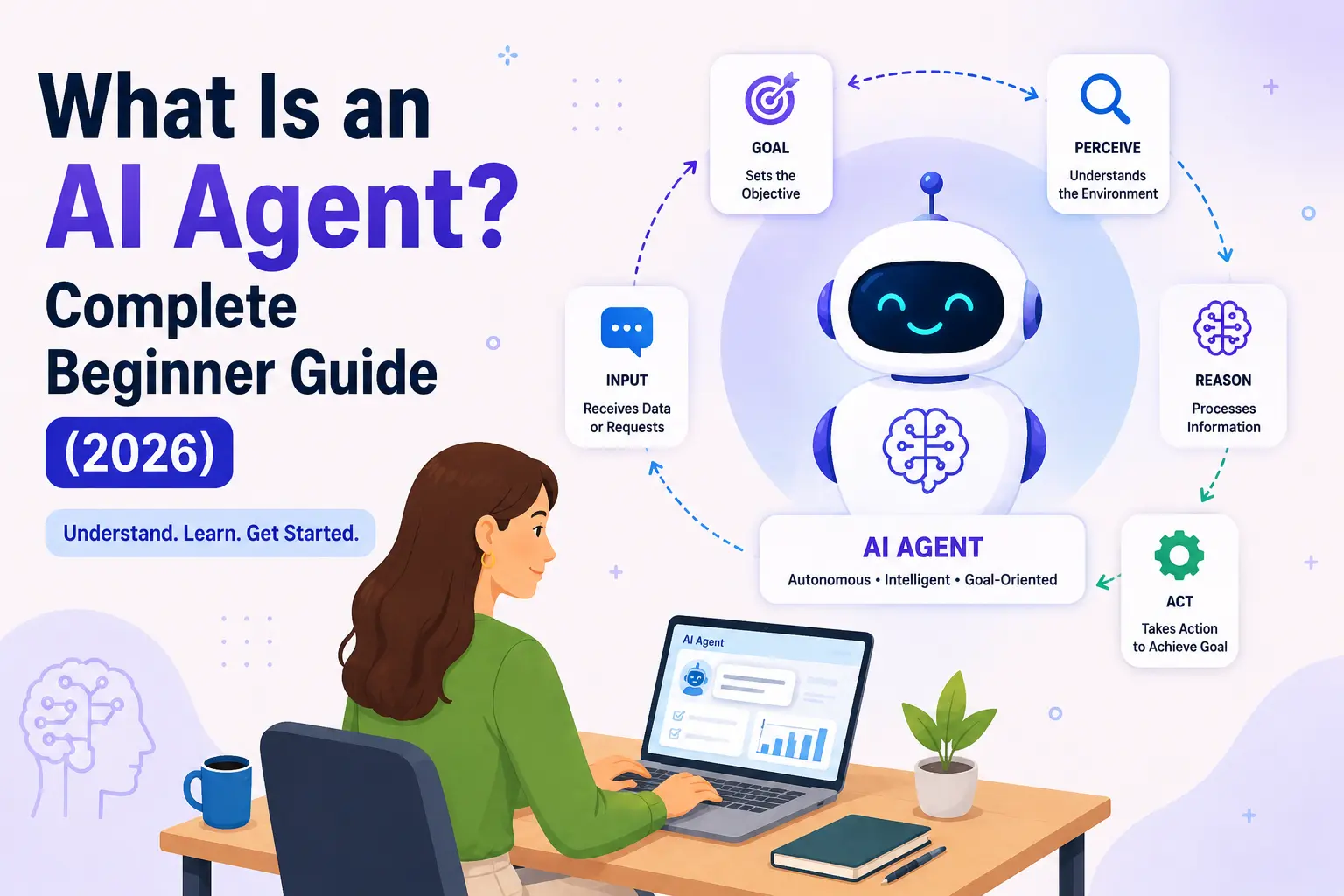
An AI Agent is an AI system that uses an LLM as its brain to pursue a goal — deciding what steps to take, using tools to take them, and checking its own results until the job is done.
A capable agent can:
- Understand a goal ("plan my trip to Tokyo under $2,000")
- Break it into steps (search flights → compare hotels → build itinerary)
- Use tools — call a flight API, search the web, run code
- Remember information across steps and sessions
- Perform real actions, not just describe them
- Check results and retry when something fails
The best analogy is a personal assistant. If you ask a knowledgeable friend how to plan a trip, they'll give you great advice — that's a chatbot. If you hand the task to an assistant, they'll go away, do the research, make the bookings, hit a problem, solve it, and come back with a finished itinerary — that's an agent. Same knowledge; completely different level of agency.
Chatbot vs AI Agent: What's the Difference?#
Not every chatbot is an AI Agent, even when both are powered by the same LLM. The difference is what happens after you press enter.
| Chatbot (e.g. basic ChatGPT) | AI Agent | |
|---|---|---|
| Memory | Remembers the current conversation | Persistent memory across steps and sessions |
| Planning | Answers one message at a time | Breaks a goal into a multi-step plan |
| Tool usage | Little or none | Calls APIs, searches the web, runs code |
| Autonomy | Waits for your next message | Works through steps on its own |
| Multi-step tasks | You drive every step | It drives; you set the goal |
| Decision making | Picks the best answer | Picks the best action, then acts |
A useful test: ask "can it change anything outside the chat window?" If the answer is no, it's a chatbot. (Worth noting: modern ChatGPT with browsing and tools enabled does behave like an agent — the line is about capabilities, not product names.)
How AI Agents Work#
Every agent, regardless of framework, runs some version of this loop:
- You give a goal — "Order groceries for this week's meal plan."
- The LLM interprets it — what does "this week's meal plan" mean? Check memory.
- It plans — get the meal plan → list ingredients → check the pantry notes → build a cart.
- It selects a tool — the grocery store's API for product search.
- It acts — searches items, adds them to the cart.
- It checks results — tomatoes are out of stock.
- It adapts and repeats — substitutes canned tomatoes, notes the change.
- It delivers — "Cart is ready: 23 items, $87. Swapped fresh tomatoes for canned — confirm before checkout?"
Steps 4–7 loop as many times as needed. This "reason → act → observe → repeat" cycle is the heartbeat of every agent, and it's why agents can handle tasks that a single question-and-answer exchange never could.
Components of an AI Agent#
Open up an agent and you'll find the same core parts:
- The LLM (the brain) — does all the reasoning and decides every next step. Everything else exists to support it.
- Memory — short-term (the current conversation and results so far) and long-term (files or databases storing preferences: "user is vegetarian").
- Planning & reasoning — the LLM's ability to decompose a big goal into ordered steps and revise the plan when reality disagrees with it.
- Tool calling — the mechanism that lets the LLM say, in structured form, "call
search_flightswith destination=Tokyo," which your code then executes. - APIs — the actual services those tools connect to: payment systems, calendars, databases, web search.
- Retrieval (RAG) — short for Retrieval-Augmented Generation: fetching relevant documents from your own data and giving them to the LLM so it answers from facts instead of guessing.
- Embeddings & vector database — the plumbing behind RAG. Embeddings turn text into lists of numbers where similar meanings sit close together; a vector database (like pgvector or Pinecone) searches them by meaning, so "refund policy" matches a document titled "returning purchased items."
- Knowledge base — the documents themselves: manuals, FAQs, wikis, past tickets.
- Feedback loop — the agent examining its own results ("the code I wrote failed its test") and correcting course before bothering you.
You don't need to master all of these on day one. But knowing the names means agent architecture diagrams stop looking like alphabet soup.
AI Agent Architecture#
Here's how the pieces connect when a request flows through:
User → Prompt → LLM → Planner → Memory → Tool Calling → External APIs → Response
- User → Prompt: your goal, plus system instructions the developer wrote ("you are a travel assistant; confirm before spending money"). Writing these well is prompt engineering.
- LLM: reads everything and decides what should happen next.
- Planner: the plan the LLM produces — sometimes explicit steps, sometimes one decision at a time.
- Memory: consulted and updated between steps so the agent doesn't repeat work or forget your preferences.
- Tool calling → APIs: the structured requests that touch the real world — search, book, write, run.
- Response: results flow back into the LLM, which loops until done, then reports back in plain language.
In real production systems, this loop also gets guardrails: spending caps, confirmation prompts before irreversible actions, and limits on how many loops the agent can run — because autonomy without limits is a bug, not a feature.
Real-World AI Agent Examples#
- Customer support agent — reads a ticket, retrieves the customer's order via API, checks the refund policy in a knowledge base, issues the refund, drafts the reply. Escalates to a human when unsure.
- Coding assistant — tools like Claude Code or Cursor's agent mode read your codebase, edit files, run tests, see failures, and fix them in a loop.
- Email assistant — triages your inbox, drafts replies in your tone, schedules meetings by checking everyone's calendars.
- Personal finance assistant — categorizes transactions, spots unusual charges, and flags subscriptions you forgot about.
- Research agent — takes a question, runs dozens of web searches, reads sources, and returns a cited report.
- Travel planner — the Tokyo example: real prices, real availability, a bookable itinerary.
- Sales agent — researches leads, personalizes outreach, and updates the CRM automatically.
- Medical admin assistant — handles scheduling and paperwork in clinics (with humans making all clinical decisions).
Notice the pattern: every example is goal in, finished work out — not question in, paragraph out.
Popular AI Agent Frameworks (2026)#
You can build an agent with plain API calls (genuinely the best way to learn). Frameworks help once things get complex:
- LangGraph — graph-based workflows with fine control over each step; strong for complex production pipelines.
- CrewAI — multiple agents with roles ("researcher," "writer") collaborating; very beginner-friendly.
- AutoGen (Microsoft) — conversation-driven multi-agent systems, popular in research.
- OpenAI Agents SDK — lightweight agents with tools and handoffs inside OpenAI's ecosystem.
- Mastra — TypeScript-first agent framework; natural fit for web developers.
- LlamaIndex — the strongest choice when your agent is heavy on RAG and document retrieval.
Advice for beginners: build one agent with raw LLM API calls first. You'll understand what every framework is actually doing for you.
Skills Needed to Build AI Agents#
A practical learning order:
- Python (or TypeScript) — the language of nearly every tutorial and SDK
- APIs — agents are mostly API calls glued together with reasoning
- Prompt engineering — your main steering wheel for LLM behavior
- LLM fundamentals — tokens, context windows, why models hallucinate
- Embeddings & vector databases — the machinery of memory and retrieval
- RAG — grounding agents in real data
- MCP (Model Context Protocol) — the open standard for connecting agents to tools, now supported across major AI platforms
- Databases & FastAPI — storing state and exposing your agent as a service
- Docker & cloud deployment — getting it off your laptop and into the world
Items 1–4 are enough to build your first working agent. The rest come naturally as your projects demand them. For the bigger career picture, see our complete AI Engineering roadmap.
Common Misconceptions#
- AI Agents are not robots. They're software. No hardware involved — the "action" happens through APIs.
- They're not fully autonomous. Well-built agents ask before irreversible actions and run inside guardrails. Full autonomy is a design choice — usually a bad one.
- They don't think like humans. Impressive reasoning is still pattern prediction, not consciousness. They make confident mistakes, which is exactly why the checking loop exists.
- They still depend on models and data. An agent is only as good as its LLM, its tools, and the data it can retrieve. Garbage in, confident garbage out.
Frequently Asked Questions#
What is an AI Agent in simple words?#
Software that uses an AI model as its brain to complete goals — planning steps, using tools, and checking its work — instead of just answering questions.
Is ChatGPT an AI Agent?#
Basic ChatGPT is a chatbot. With browsing, code execution, and task tools enabled, it behaves like an agent. The label depends on capabilities, not the brand.
Do AI Agents use APIs?#
Constantly — APIs are how agents touch the real world: searching, booking, sending, saving.
Can beginners build AI Agents?#
Yes. If you can write basic Python and call an API, you can build a simple agent in a weekend. Start small: an agent with one tool and one goal.
Which programming language should I learn first?#
Python — it has the most tutorials, SDKs, and examples. TypeScript is a solid alternative if you're already a web developer.
What's the difference between an LLM and an AI Agent?#
The LLM is the brain; the agent is the whole worker. An LLM produces text. An agent wraps that brain with memory, tools, and a loop so it can act.
Are AI Agents replacing software developers?#
They're changing the job, not eliminating it. Developers increasingly supervise agents — and building, steering, and evaluating agents is itself the fastest-growing skill in the field.
What is the future of AI Agents?#
More reliable, longer-running, and more collaborative — teams of agents working together on hours-long tasks, with standards like MCP letting them plug into any tool.
Wrapping Up#
Here's the whole guide in three sentences. An LLM predicts text; an AI Agent wraps that brain with planning, memory, and tools so it can actually do things. The loop is always the same: understand the goal, plan, act, check, repeat. And every skill involved — Python, APIs, prompting, RAG — is learnable by an ordinary developer in months, not years.
The best time to start is now, while the field is young enough that six months of building puts you ahead of most people. Pick a tiny agent project this week and build it.
Next read: Model Context Protocol (MCP): Complete Guide for Beginners — the standard that's becoming the "USB-C" connecting AI Agents to every tool. And if you want to see real agent-powered tools in action, browse the AI Agents category in our directory.