Model Context Protocol (MCP): Complete Guide for Beginners (2026)
Imagine hiring an employee who can answer any question you ask, brilliantly, but cannot open a browser, access your files, use Slack, check your calendar, or query a database. That's exactly how large language models worked before Model Context Protocol — enormous knowledge, no hands.
Every AI product that wanted its model to actually do something had to build a custom integration for every single tool: one connector for Slack, another for Google Drive, another for the internal database, each with its own authentication, its own quirks, its own maintenance burden. Multiply that across dozens of tools and multiple AI providers, and you get an integration problem that grows exponentially, not linearly.
Model Context Protocol (MCP) is Anthropic's answer to that problem, and it's the reason MCP has gone from a late-2024 announcement to something nearly every serious AI engineering conversation references by 2026. It shows up in agent frameworks, in n8n and Claude Desktop, in enterprise AI rollouts — because it solves a structural problem, not a feature gap.
This guide explains what MCP actually is, how its architecture works end to end, how it compares to APIs and function calling, and how to start building with it — written for beginners, developers, and AI engineers alike.
What Is Model Context Protocol (MCP)?#
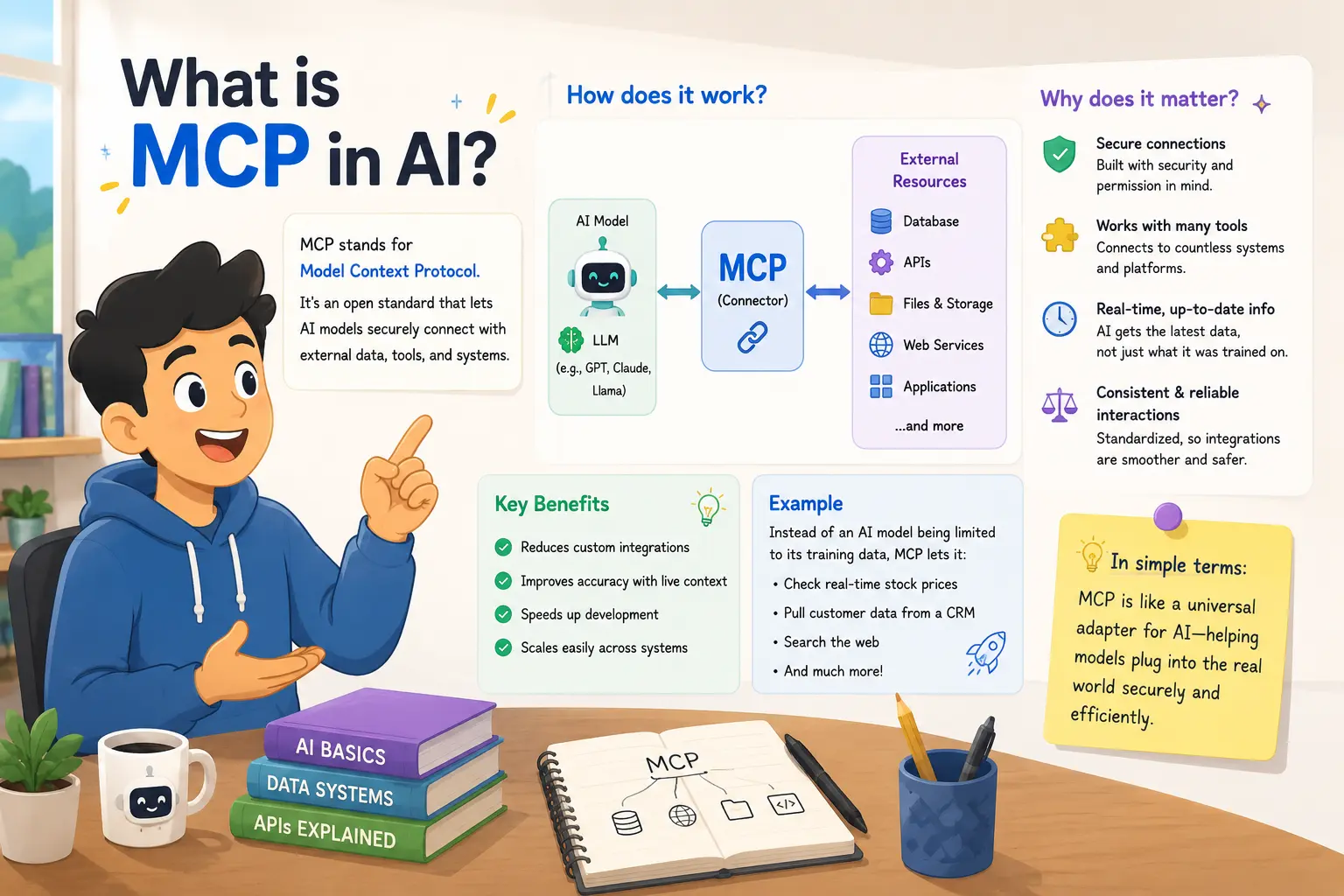
Model Context Protocol is an open standard, introduced by Anthropic in late 2024, that defines a common way for AI models to connect to external tools, data sources, and systems.
Think of it like USB-C. Before USB-C, every device needed its own specific cable and adapter — one for your laptop charger, another for your camera, another for your phone. USB-C didn't make any single device more powerful; it made every device speak the same physical and electrical language, so any USB-C cable works with any USB-C port.
MCP does the same thing for AI. Instead of building a custom, one-off integration between "this AI model" and "that tool," you build one MCP server for the tool, and any MCP-compatible AI client can use it — Claude, an agent framework, a custom application — without needing tool-specific glue code.
That single design decision is why MCP matters more than it might sound at first: it turns an integration problem that scales as (number of AI apps) × (number of tools) into one that scales as (number of AI apps) + (number of tools).
Why Traditional AI Integrations Don't Scale#
Before MCP, connecting an LLM to a real tool generally meant one of a few approaches, and each had real limits.
Custom APIs work, but every tool exposes data differently — different auth schemes, pagination, error formats. Wiring an LLM to five APIs means maintaining five completely different integration layers.
Tool-specific SDKs reduce some of that pain, but lock you into whatever the vendor decided the interface should look like, and rarely account for how an LLM specifically needs to consume the data.
Plugin systems — the earlier attempt several AI platforms made — required a separate plugin per platform. A plugin built for one AI product didn't work in another, so the same integration got rebuilt repeatedly by different teams.
The common thread: none of these approaches were designed model-agnostically. Each integration was built for one specific AI product, which meant the maintenance burden multiplied every time a new tool or a new AI platform entered the picture.
What Problems Does MCP Solve?#
MCP directly targets the fragmentation described above:
- Standardized communication — one protocol, not a different shape per tool or per AI vendor
- Reusable tools — build an MCP server once, use it from any MCP-compatible client
- Simpler integrations — no more bespoke glue code per tool per platform
- AI interoperability — the same filesystem or database server works with Claude today and a different AI client tomorrow
- Lower maintenance — one server to update instead of N platform-specific integrations
- Better developer experience — a consistent, documented interface instead of reverse-engineering each vendor's quirks
- Scalable AI systems — adding a new tool doesn't require touching every AI application that might want to use it
How Model Context Protocol Works#
MCP's architecture has four main pieces, and understanding each one is the key to understanding the whole system.
MCP Host#
The host is the AI application the user actually interacts with — Claude Desktop, an IDE with an AI assistant, a custom agent application. The host is what decides when to reach for a tool, based on the conversation.
MCP Client#
The client lives inside the host and manages the actual connection to one specific MCP server. If a host is connected to three different MCP servers — say, a filesystem server, a GitHub server, and a database server — it runs three separate clients, one per connection.
MCP Server#
The server is the program that exposes a specific capability: read files, query a database, search GitHub issues, send a Slack message. A server declares what it can do through three primitives — tools, resources, and prompts — described below. Anyone can build one, and a well-built server works with any MCP-compatible host.
Transport Layer#
This is the actual communication channel between client and server — typically standard input/output for local servers running on your machine, or HTTP with server-sent events for remote servers. Messages themselves are formatted as JSON-RPC, a lightweight, well-established standard for structured request/response communication.
Tools, Resources, and Prompts#
These are the three things a server can expose:
- Tools — actions the AI can invoke, like
search_invoicesorsend_email. This is the closest concept to function calling. - Resources — data the AI can read, like a file's contents or a database record, without necessarily invoking an action.
- Prompts — reusable prompt templates the server provides, so common workflows don't need to be reinvented by every client.
There's also sampling — a mechanism letting a server request that the host's LLM generate a completion on its behalf, useful when a server needs a language model's help mid-task without hosting its own — and notifications, which let a server push updates to the client when something changes, instead of the client having to poll constantly.
MCP Architecture Explained#
Here's the full path a request actually takes:
User asks a question
      ↓
Host application (e.g. Claude)
      ↓
MCP Client (inside the host)
      ↓
MCP Server (exposes a tool)
      ↓
External system (database, API, filesystem)
      ↓
Response flows back up through the same chain
The user never talks to the server directly, and the server never talks to the LLM directly — the host and client mediate the whole exchange, which is exactly what makes the same server reusable across different hosts.
Real-World Example#
Say a user asks: "Find all invoices over $5,000 and summarize them."
- The host (say, Claude) recognizes this requires data it doesn't have in its own training or context.
- Claude's MCP client sends a structured request to a connected database MCP server, asking it to run a query matching invoices over $5,000.
- The MCP server executes that query against the actual database and returns the matching rows as structured data.
- That data flows back to Claude through the same client connection.
- Claude reads the returned invoice data and generates a natural-language summary — totals, notable outliers, whatever the user actually wanted.
Nothing about steps 2 through 4 required Claude to know anything about the database's schema, credentials, or query language ahead of time. The MCP server encapsulated all of that, and Claude simply asked for what it needed in a standardized way.
MCP vs APIs#
| Traditional APIs | MCP | |
|---|---|---|
| Setup | Custom per API, per project | Build once, reuse across hosts |
| Flexibility | Rigid, vendor-defined shape | Standardized tools/resources/prompts |
| Maintenance | Scales with every integration | One server serves every client |
| Scalability | Linear pain per new tool | Additive, not multiplicative |
| Security | Varies wildly by API | Consistent auth/permission model |
| Developer Experience | Reverse-engineer each API's docs | Predictable, documented interface |
| AI Compatibility | Not designed for LLMs specifically | Purpose-built for AI consumption |
| Standardization | None across vendors | Open, shared specification |
| Use Cases | General software integration | AI models needing real-world access |
MCP isn't a replacement for APIs — a well-built MCP server is often just a thoughtful wrapper around an existing API. The difference is that the wrapper speaks a language every AI host already understands.
MCP vs Function Calling#
Function calling — the mechanism where an LLM outputs a structured call to a function you've defined, and your code executes it — is genuinely similar to MCP's tools concept, and this is the comparison that confuses people most.
| Function Calling | MCP | |
|---|---|---|
| Scope | Defined per application, per request | Defined once on a reusable server |
| Reuse | Rebuilt for every app that needs it | Same server works across hosts |
| Discovery | Developer manually lists functions | Client can query server for its tools |
| Standardization | Varies by AI provider's API | One open specification |
| Best for | A single app with a fixed, small toolset | Tools meant to be shared and reused |
Use plain function calling when you're building one application with a handful of tools that will never be reused elsewhere. Reach for MCP when a tool should realistically be usable by more than one AI application, now or later — which, in practice, is most tools worth building well.
MCP vs Plugins#
Plugin systems from earlier AI platforms ran into a structural problem: a plugin built for one AI product's plugin format didn't work anywhere else. Every AI company effectively asked developers to build the same integration multiple times, once per platform, in that platform's proprietary shape.
MCP fixes this by being provider-agnostic from the start. An MCP server for GitHub isn't "Claude's GitHub plugin" — it's just a GitHub MCP server, usable by any compliant host. That single change removes the duplicate-work problem plugins never solved.
Building AI Agents with MCP#
This is where MCP earns its place in the AI agent stack. An agent's usefulness is largely defined by what it can actually touch — and MCP gives an agent a standardized way to search documents, call external APIs, query databases, read and write GitHub issues, browse the web, send emails, or schedule meetings, all without the agent's developer writing a bespoke integration for each capability.
Practically, this means an agent framework can advertise "connect any MCP server" instead of "we support these twelve specific integrations," which is exactly the interoperability shift that made MCP adoption move quickly once major platforms began supporting it.
MCP Use Cases#
| Use Case | How MCP Helps |
|---|---|
| Customer Support | Pulls live order/account data into a support agent's context |
| Healthcare | Connects to patient records systems under controlled permissions |
| Finance | Queries transaction and invoice databases in real time |
| Education | Retrieves course material and student records for tutoring agents |
| Research | Searches papers, databases, and internal knowledge bases |
| Business Automation | Powers agent steps inside tools like n8n |
| CRM | Reads and updates customer records during a conversation |
| Sales | Pulls pipeline data and drafts follow-ups automatically |
| DevOps | Queries logs, triggers deploys, checks system status |
| Coding Assistants | Reads a codebase, runs tests, opens pull requests |
| Document Search | Retrieves relevant internal documents on demand |
| Internal Company Chatbots | Connects to wikis, tickets, and internal tools |
| Personal AI Assistants | Reads calendars, email, and personal files with permission |
Benefits of MCP#
- Interoperability — one server works across many AI hosts
- Modularity — tools, resources, and prompts are cleanly separated
- Scalability — adding tools doesn't multiply integration work
- Security — a consistent permission and authentication model
- Reusable tools — build once, use everywhere that matters
- Faster development — less time reverse-engineering bespoke APIs
- Easier maintenance — one codebase per tool, not one per platform
Limitations of MCP#
To stay balanced: MCP isn't a finished, risk-free technology yet.
- Ecosystem maturity — fewer battle-tested servers exist than for mature API ecosystems
- Learning curve — understanding hosts, clients, servers, and transports takes real onboarding time
- Security considerations — a poorly secured MCP server can expose more than intended; permission scoping matters
- Server management — someone has to run, monitor, and update each server
- Debugging — tracing a failure across host → client → server → external system has more layers than a direct API call
- Adoption gaps — not every AI platform supports MCP yet, though support is expanding quickly
Popular MCP Servers#
A few widely used examples, each exposing a different real-world capability:
- Filesystem — read, write, and search local files
- GitHub — manage issues, pull requests, and repository content
- PostgreSQL — query and inspect a live database
- Google Drive — search and retrieve documents
- Slack — read channels and send messages
- Notion — read and update pages and databases
- Git — inspect commit history and diffs
- Browser automation — navigate and extract data from web pages
How to Start Learning MCP#
A realistic four-week path for a developer starting from zero:
Week 1 — Fundamentals. Read the core MCP concepts (hosts, clients, servers, tools, resources). Install Claude Desktop and connect an existing community MCP server, like the filesystem server, just to see the flow work end to end.
Week 2 — Build a simple server. Using the official Python or TypeScript SDK, build a minimal MCP server exposing one tool — something like a weather lookup or a to-do list. Focus on getting one tool working correctly rather than many tools working poorly.
Week 3 — Connect it to a real data source. Extend your server to talk to an actual database or API instead of hardcoded data. This is where authentication, error handling, and resource definitions start to matter.
Week 4 — Integrate with an agent framework. Connect your server to a framework like LangChain, or to n8n's MCP support, and build a small agent workflow that uses it alongside other tools. At this point, wrap it in Docker so it's portable, and push it to GitHub so others can reuse it.
Frequently Asked Questions#
Is MCP open source?#
Yes. The specification and reference SDKs are open source, and anyone can build or run an MCP server without a license from Anthropic.
Who created MCP?#
Anthropic introduced Model Context Protocol in November 2024 as an open standard, not a proprietary Claude-only feature.
Does OpenAI support MCP?#
MCP was designed to be provider-agnostic, and adoption has extended beyond Anthropic's own products as the ecosystem has grown — check current provider documentation for the latest support status.
Can ChatGPT use MCP?#
Support for MCP varies by product and changes as the ecosystem matures; the protocol itself doesn't restrict which AI provider can implement it.
Do I need coding experience?#
To use an existing MCP server through an app like Claude Desktop, no. To build your own MCP server, yes — basic Python or TypeScript is enough to get started.
Is MCP replacing APIs?#
No. MCP servers are usually built as a layer on top of existing APIs, giving AI models a standardized way to reach them — not a replacement for the APIs themselves.
Can MCP work with LangChain?#
Yes, MCP servers can be integrated into LangChain-based agents, letting a LangChain agent use the same reusable tools as any other MCP-compatible host.
Can MCP connect to databases?#
Yes — database MCP servers exist for common systems like PostgreSQL, letting an AI model query real data through a controlled, permissioned interface.
Can beginners learn MCP?#
Yes. The core concepts are approachable, and connecting to an existing community server is a same-day task even for someone new to AI engineering.
How secure is MCP?#
It depends on how a server is built — MCP supports scoped permissions, but a carelessly configured server can still expose more than intended, same as any integration.
Does MCP require Docker?#
No, but packaging a server in Docker makes it easier to deploy and share consistently.
What's the difference between a tool and a resource?#
A tool is an action the AI can invoke, like running a search; a resource is data it can read directly, like a file's contents, without triggering an action.
Final Verdict#
Model Context Protocol solves a problem that was quietly limiting every AI product built before it: the integration layer between models and the real world was fragmented, duplicated, and expensive to maintain. MCP replaces that fragmentation with one open, reusable standard.
As AI agents become more capable and more widely deployed, a protocol like MCP is likely to become foundational infrastructure — the connective layer between models and the tools, data, and systems they need to actually get work done, in much the same way a common cable standard became invisible infrastructure for an entire category of devices.
If this connects the dots on how AI agents actually reach outside their own context, or you want the foundational concepts behind what AI engineering and RAG look like in practice, those guides are the natural next stop. And if you're evaluating automation platforms that are adding MCP support themselves, our n8n vs Make comparison is worth a read too.