How to Create 30 Instagram Reels a Month with AI (Without Burning Out)
Somewhere around month four of trying to post Reels consistently, I did the math on how much time I was actually spending and it genuinely upset me. I was filming, hand-cutting clips, writing captions, adding text overlays, and finding music one Reel at a time, and each one was eating close to an hour if I counted everything. At that rate, posting daily wasn't a content strategy, it was a part-time job I wasn't getting paid for.
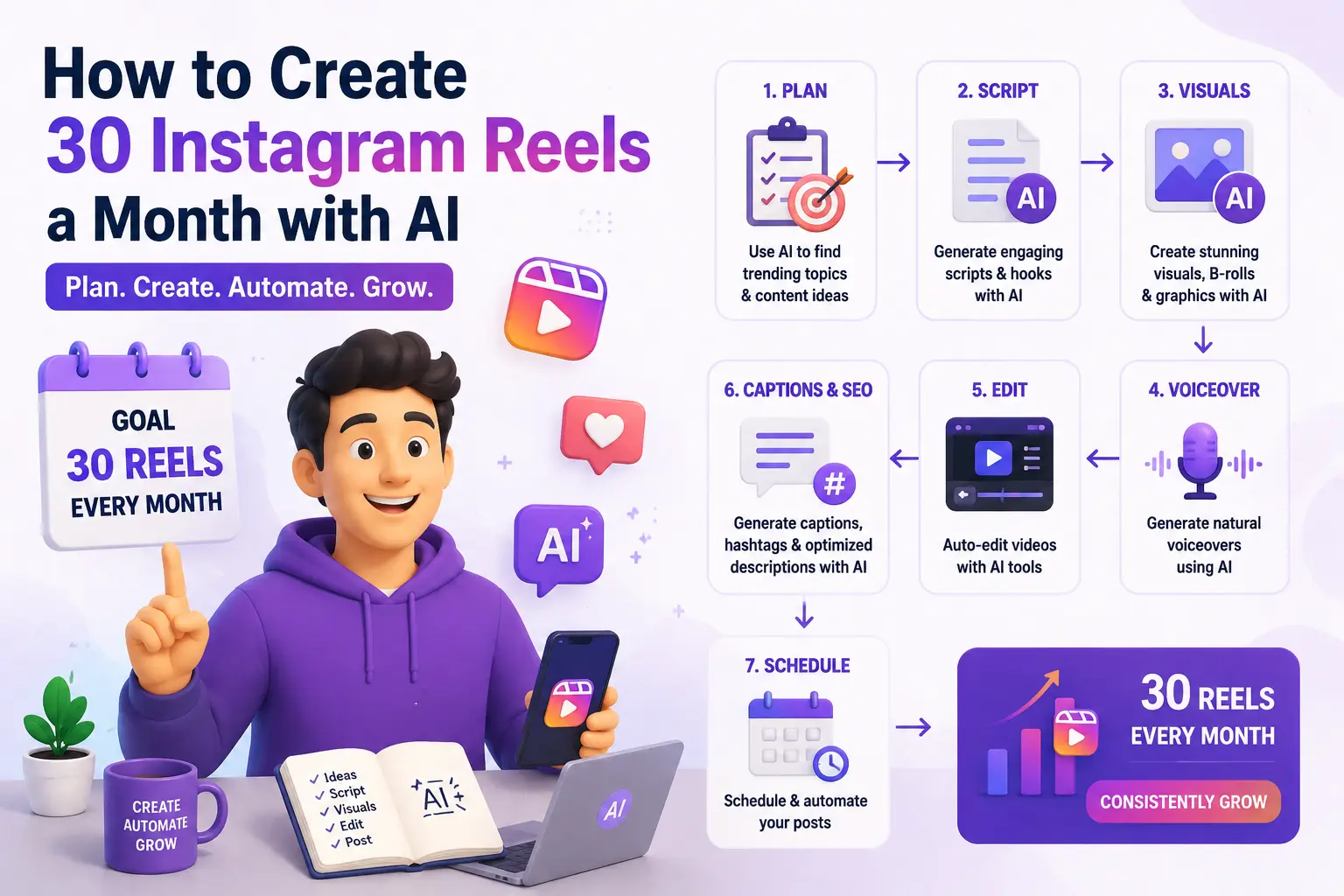
What changed wasn't that I got faster at editing. It's that I stopped treating each Reel as its own project and started treating a whole month of Reels as one batch job, with AI doing the repetitive middle steps I used to do by hand. I now sit down roughly twice a month, and thirty Reels come out the other side. I want to walk through exactly how, because "use AI for your Reels" without the actual mechanics is just marketing copy.
The mental shift that mattered more than any tool#
Before I get into specific apps, I have to be honest about the thing that actually fixed this, because it wasn't software. It was realizing that "30 Reels" doesn't mean 30 separate ideas. It means one or two solid recording sessions that get sliced into far more pieces than I used to think were possible.
I used to sit down, film one thing, edit it, post it, and then sit there the next day wondering what to film next. That's an exhausting way to live, and it's also why most people's Reels output is inconsistent — you're constantly restarting the hardest part, which is deciding what to say. Once I flipped to recording in long, rambling batches and letting AI find the good ten-second pieces afterward, the actual bottleneck of the month changed completely. Filming stopped being the hard part. Deciding what was worth cutting became the hard part, and that's a problem AI turns out to be genuinely great at.
Step one: record long, messy, and only once or twice a month#
Twice a month, I set aside about two hours and just talk. Not scripted, not perfectly framed — I pick five or six topics I know something about and ramble on each one for ten or fifteen minutes, the way I would if a friend asked me a question and I had time to actually answer properly. I don't stop and restart when I mess up a sentence. I don't worry about it being usable in full. I'm intentionally generating raw footage, not a finished product.
By the end of one of these sessions I've got somewhere between an hour and a half to two hours of footage. That sounds like a lot to deal with, and it would be if I were the one scrubbing through it looking for good moments. I'm not. That's the next step.
Step two: let Opus Clip find the actual good parts#
This is the tool that changed the math for me more than any other single thing. I upload the full raw recording to Opus Clip, and it goes through the entire thing looking for moments that could stand on their own as short clips — a complete thought, a strong opening line, a point that lands cleanly without needing the surrounding context.
What it hands back isn't just "here are ten random 30-second chunks." It scores each suggested clip and gives a rough sense of why it thinks a moment works — usually flagging things like a strong hook in the first few seconds, or a self-contained idea that doesn't need setup. Out of two hours of raw rambling, I typically get 25 to 35 flagged clips of varying quality. Not all of them are gold. Some are genuinely unusable. But going from "watch two hours of yourself talking and manually mark timestamps" to "review 30 pre-selected candidates" is the single biggest time save in this entire system, by a wide margin. That review pass takes me maybe 20 minutes instead of the hour-plus of scrubbing I used to do by hand.
I keep the ones that feel true to something I'd actually want to say publicly, cut the ones that don't, and usually end up with somewhere around 20 solid clips from one recording session. Two sessions a month gets me comfortably past 30.
Step three: captions that don't make people scroll past#
Here's a detail that took me embarrassingly long to take seriously: most people watch Reels with the sound off, at least at first, especially when they're scrolling in public or at work. If your captions are bad, or worse, if you don't have any, you've lost the majority of your potential audience before they've heard a word you said.
I use Captions for this specifically because it's built entirely around this one job rather than being a general video editor with captions bolted on. I drop in each clip from the previous step, and it auto-transcribes and times the captions to match speech almost perfectly, including catching filler words and natural pauses in a way that actually looks intentional rather than robotic. The styling options let me keep one consistent look across every Reel — same font, same highlight color on emphasized words — which matters more than I expected for making a feed look cohesive instead of like thirty unrelated experiments.
The part I didn't expect to matter: Captions also flags dead air and long pauses automatically, the same "um, awkward silence, restart the sentence" moments that happen naturally when you're rambling unscripted for fifteen minutes. Trimming those out is what takes a slightly rough raw clip and makes it feel like it was actually planned that way.
Step four: covering the days I didn't record talking-head footage#
Not every Reel works as a straight talking-head clip, and honestly, a feed made up of nothing but me facing a camera gets monotonous fast. For anything that needs a different visual — a quick tips list, a before/after, a concept explainer — I lean on two different tools depending on what I need.
For quick text-and-graphic style Reels, I use Canva AI. I'll take one of the ideas from my recording session that didn't quite work as a talking clip but is still a good point, and turn it into a short animated text sequence instead — a few punchy lines building to a conclusion, with Canva's AI handling the transitions and pacing so it doesn't feel like a static slideshow. This is genuinely faster than it sounds; a simple one usually takes ten minutes start to finish.
For anything where I want a voiceover without re-recording myself saying the same thing five times to get the tone right, I use ElevenLabs to generate a clean voiceover from a script, which I pair with stock or generated footage. I'm careful about this one — I only use it for genuinely informational content where the value is the information, not content where people expect to hear my actual voice reacting in real time. Using a synthetic voice for something that's supposed to feel like a personal take would be exactly the kind of thing that erodes trust, and I don't think that tradeoff is worth it for content built around being "me."
Step five: the batching calendar that keeps this from collapsing#
None of the above matters if the finished clips just sit in a folder because I forgot to post them. The last piece of the system is scheduling everything from a batch in one sitting rather than posting reactively each day.
After I've got my 20-something finished clips from a session, I spend maybe 30 minutes writing captions and hashtags for all of them in one pass, using ChatGPT to draft a first version of each caption based on a one-line summary of what the clip is about, then editing every single one by hand before it goes anywhere near a scheduling tool — for the same reason I don't post AI-drafted LinkedIn posts unedited. A caption that sounds like it was written by a template is obvious, and it undercuts a clip that might otherwise have looked personal and unscripted.
Once captions are done, everything gets loaded into a scheduler and spread across the coming two to three weeks, roughly one Reel a day with a little variance so it doesn't look suspiciously robotic. This is the step that actually gets me to "30 a month" reliably, because posting stops being a daily decision I have to remember to make. It becomes a decision I made once, twice a month, in a single sitting.
What this actually costs, time-wise#
I want to give real numbers here because vague claims like "save hours" don't mean much without a comparison. One full batch cycle — recording, clip selection, caption styling, covering non-talking-head ideas, and scheduling — takes me about four to five hours total, twice a month. That's somewhere around nine to ten hours a month to produce and schedule 30 Reels.
Doing this the old way, one Reel at a time with manual editing, manual caption writing, and manual scrubbing through footage for good moments, was easily an hour per Reel on a good day, sometimes closer to ninety minutes when I was being fussy about it. Thirty Reels at that rate is 30 to 45 hours a month. The AI-assisted batch system isn't magic and it isn't zero effort, but it's a genuine four-to-five-times time reduction, and more importantly, it turned this from something I dreaded into something I can actually sustain.
Where I draw the line#
A few things I've deliberately kept out of this system, because I think the caveats matter as much as the workflow:
- I don't let AI write the actual talking points. The ideas and opinions in the raw recordings are mine, unscripted. AI's job is finding the good parts and cleaning up the presentation, not generating what I supposedly think about something.
- I don't use synthetic voice or avatars for anything personal. Tools like HeyGen can generate a talking avatar convincingly, and I'm sure that's the right call for some use cases, but for content that's meant to feel like an actual person's take, I think using a synthetic version of myself would eventually get noticed and would cost more trust than it saves in editing time.
- I still watch every single clip before it gets scheduled. Auto-selection tools are good, not perfect. Something Opus Clip flags as a strong moment occasionally reads differently out of context than it did in the full recording, and catching that before it goes out is a five-second check that's saved me from a couple of genuinely cringeworthy posts.
The honest summary#
Thirty Reels a month sounds like a lot until you stop thinking of it as thirty separate projects. It's really two recording sessions, one clip-selection pass per session, some caption styling, and a single scheduling sitting. The tools aren't doing the creative work — they're doing the repetitive, mechanical work that used to eat all the time I should have been spending on having something worth saying in the first place.
If you're stuck posting sporadically the way I used to, I'd skip trying to find "the one AI Reels tool that does everything" and instead look at your own bottleneck specifically. For me it was clip selection eating hours out of every session. For you it might be captions, or scripting, or just remembering to post at all. Fix the actual bottleneck first, and the rest gets a lot easier to sustain.
Want to see what's out there for each step of this? Browse AI video tools in our directory to compare options for clipping, captioning, and editing.